How to connect Stripe to Billune (coming soon)
Stripe support is **coming soon** to Billune — the integration is fully built and tested, and will be enabled in the UI once we complete final compliance verification. For now, use PayPal or Razorpay to collect payments. When Stripe goes live, this is exactly how you'll connect it.
Stripe is the industry-standard card processor globally — supported in 45+ countries, industry-leading fraud detection, and settlement to your bank in 2-7 days depending on your country. If your clients pay by card and are in a country Stripe supports, Stripe is almost certainly the right first gateway to connect.
Connecting takes about 2 minutes. You'll paste a single API key (Stripe's Secret key from your dashboard) into Billune's Payment Accounts page. Billune immediately pings Stripe to verify the key works, and once verified, every future invoice can offer Stripe as its payment gateway.
- 01
Grab your API keys
In your Stripe dashboard, go to Developers → API keys (https://dashboard.stripe.com/apikeys). Copy the Secret key (starts with
sk_live_orsk_test_). Optionally also copy the Publishable key (pk_live_...) — Billune doesn't require it, but Stripe's own dashboard shows both together. - 02
Open Billune's Payment Accounts
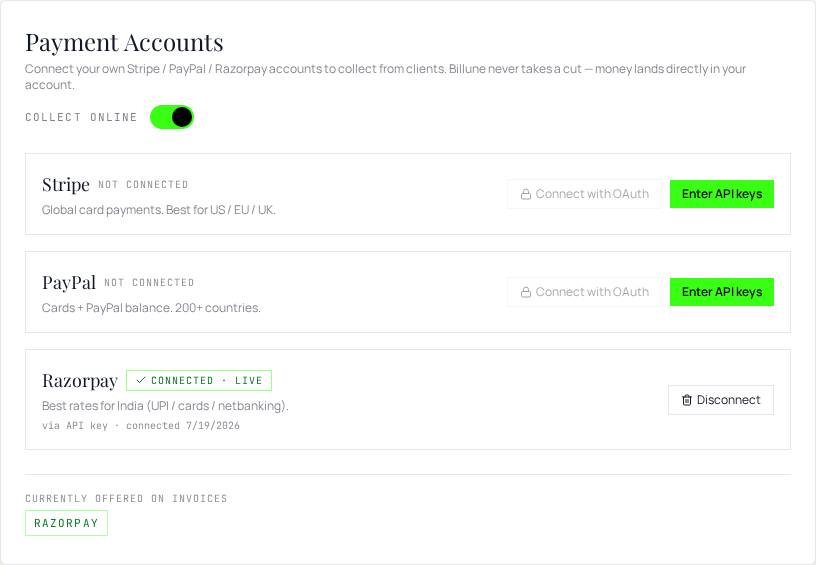
In Billune, go to Settings → Payment Accounts and click Enter API keys on the Stripe row.
- 03
Paste and connect
Paste the secret key into the form. If you copied the publishable key, paste that too (optional). Click Verify & connect. Billune pings Stripe's API to confirm the key works — if it's valid, the row flips to Connected · LIVE. If Stripe rejects the key (wrong key, testing key mismatch), you'll see an inline error.
- 04
Test with a real invoice
Create a small test invoice ($1). In its Branding tab, select Stripe as the payment gateway. Send by email to yourself. Click the Pay button and complete checkout — the invoice should mark itself paid within a few seconds. If it doesn't, check that you've enabled the
checkout.session.completedwebhook event in Stripe (Billune configures this automatically for you).